This article records my attempt at porting postmarketOS myself. It is currently unfinished.
The porting tutorials on the postmarketOS Wiki, Porting to a new device and Mainlining Guide, are already very clear. This article is basically a Chinese translation of the Wiki content plus a few notes of my own.
1. Hardware Requirements #
- Phone to port: Sony Xperia 5 II (XQ-AS72, codename sony-pdx206), Bootloader already unlocked.
This model has an entry on the postmarketOS Wiki, and it can also boot with the mainline kernel developed by somainline. But because UFS has a bug (described later), there is no official port yet.
- PC: must be 64-bit Linux. A VM also works. My CPU is an i5-7400 with 16GB RAM.
postmarketOS system files are tiny. You do not need to download tens of gigabytes of source code, and compilation does not take several hours. Refreshing, honestly.
2. Install pmbootstrap #
pmbootstrap is the tool used to create postmarketOS installation files and do porting work.
- Install Python3, openSSL, Pip, and Git on the system:
sudo apt install python3 openssl python-pip3 git- Install pmbootstrap with pip and refresh the environment:
pip3 install --user pmbootstrap
source ~/.profile- Install autocompletion and add it to
~/.bashrc:
 pip3 install --user argcomplete
 echo 'eval "$(register-python-argcomplete3 pmbootstrap)"' >> ~/.bashrc
source ~/.bashrc- If entering
pmbootstrapstill says the command cannot be found after installation, reboot.
3. Initialize Device Settings #
Initialize pmbootstrap and enter the device settings according to the prompts. The settings for the following questions are stored in ~/.config/pmbootstrap.cfg.
~ $ pmbootstrap init
# Work directory
Work path [/home/ivon/.local/var/pmbootstrap]: Enter
# For the update channel, enter stable or edge. edge may sometimes break dependencies because of Alpine upstream updates
Channel [edge]:  v22.06
# Select vendor
Vendor [qemu]: sony
# Enter Sony's official device codename
Device codename: pdx206
# Confirm porting a new device
You are about to do a new device port for 'sony-pdx206'.
Continue? (y/n) [y]: y
# Enter the processor architecture
Device architecture (armv7/aarch64/x86_64/x86) [armv7]: aarch64
# Enter the manufacturer
Who produced the device (e.g. LG)? sony
# Enter the full phone name
What is the official name (e.g. Google Nexus 5)? Sony Xperia 5 II
# Phone release year
In what year was the device released (e.g. 2012)? 2020
# Set the device type to handset
What type of device is it?  handset
# No hardware keyboard, answer n
Does the device have a hardware keyboard? (y/n) [n]: n
# Whether there is an SD card slot, answer y
Does the device have a sdcard or other external storage medium? (y/n) [n]: y
# Choose fastboot as the flashing method
Which flash method does the device support?
Flash method (0xffff/fastboot/heimdall/none/rkdeveloptool/uuu) [0xffff]: fastboot
# Let pmbootstrap analyze the boot parameters of boot.img. I used the boot.img from a third-party ROM
[11:15:10] You can analyze a known working boot.img file to automatically fill out the flasher information for your deviceinfo file. Either specify the path to an image or press return to skip this step (you can do it later with 'pmbootstrap bootimg_analyze').
Path: /home/ivon/下載/Evo/extracted_20220826_113410/boot.img
# Default username
Username [user]: user
# Choose the graphical interface. Before confirming hardware acceleration works, choose XFCE4 first
User interface [weston]: xfce4
# Keep the default boot partition settings, enter n
Additional options: extra free space: 0 MB, boot partition size: 256 MB, parallel jobs: 9, ccache per arch: 5G, sudo timer: False, mirror: http://mirror.postmarketos.org/postmarketos/
Change them? (y/n) [n]: n
# Whether to install extra packages
Additional packages that will be installed to rootfs. Specify them in a comma separated list (e.g.: vim,file) or "none"
Extra packages [none]: none
# Set the system timezone
Your host timezone: Asia/Taipei
Use this timezone instead of GMT? (y/n) [y]: y
# Set the system language. English is recommended first
Choose default locale for installation: en_US.UTF-8
# Set the device name
Device hostname (short form, e.g. 'foo') [sony-pdx206]: Enter
# Whether to copy local SSH keys to the postmarketOS system
Would you like to copy your SSH public keys to the device? (y/n) [n]: n
# Automatically build outdated packages
After pmaports are changed, the binary packages may be outdated. If you want to install postmarketOS without changes, reply 'n' for a faster installation.
Build outdated packages during 'pmbootstrap install'? (y/n) [y]: y
4. Set Kernel Build Options #
pmbootstrap automatically creates an ARM chroot environment, so remember to enter your password when needed. While compiling, open another terminal and run pmbootstrap log to watch the error messages.
-
First, get the phone’s kernel source code. postmarketOS recommends looking for the kernel from LineageOS’s Github, but LineageOS does not currently have one for the Xperia 5 II. So I had to use a third-party kernel from XDA, such as XperiaBricker’s version, which is what I used. Sony also releases kernel source.
-
Switch to the working directory:
cd /home/$USER/.local/var/pmbootstrap/cache_git/pmaports/device/testing/linux-sony-pdx206-
There will be an
APKBUILDfile inside. This is the kernel build configuration file. The#Sourceblock is the source repository for the kernel. -
Since this does not use LineageOS’s official repo, modify the
#Sourceblock as follows. The items under$_configon the last line are the patches to apply during compilation.
# Source
_repository="android_kernel_sony_sm8250"
_commit="8bdbbde86f74be117281c82f4181d1f938659ce0"
_config="config-$_flavor.$arch"
source="
	$pkgname-$_commit.tar.gz::https://github.com/XperiaBrickers/$_repository/archive/$_commit.tar.gz
	$_config
	gcc10-extern_YYLOC_global_declaration.patch
    gcc7-give-up-on-ilog2-const-optimizations.patch
    gcc8-fix-put-user.patch
    kernel-use-the-gnu89-standard-explicitly.patch
"- In the kernel source repository, find the
Makefile. Based on theVERSION,PATCHLEVEL, andSUBLEVELwritten inside, fill in the version number forpkgverin APKBUILD. In this example, it is 4.19.195. Then save the file.
pkgver=4.19.195- Find
defconfigfrom the kernel source repository. This is the file used to generate the kernel config. For example, this kernel’s config is located underarch/arm64/configs. Download it to the working directory, then rename it to config-device-name-codename-arch:
wget https://raw.githubusercontent.com/XperiaBrickers/android_kernel_sony_sm8250/base/arch/arm64/configs/pdx206_defconfig
mv pdx206_defconfig config-sony-pdx206.aarch64- Download the kernel source and generate checksums. Run this command whenever the APKBUILD file has changed.
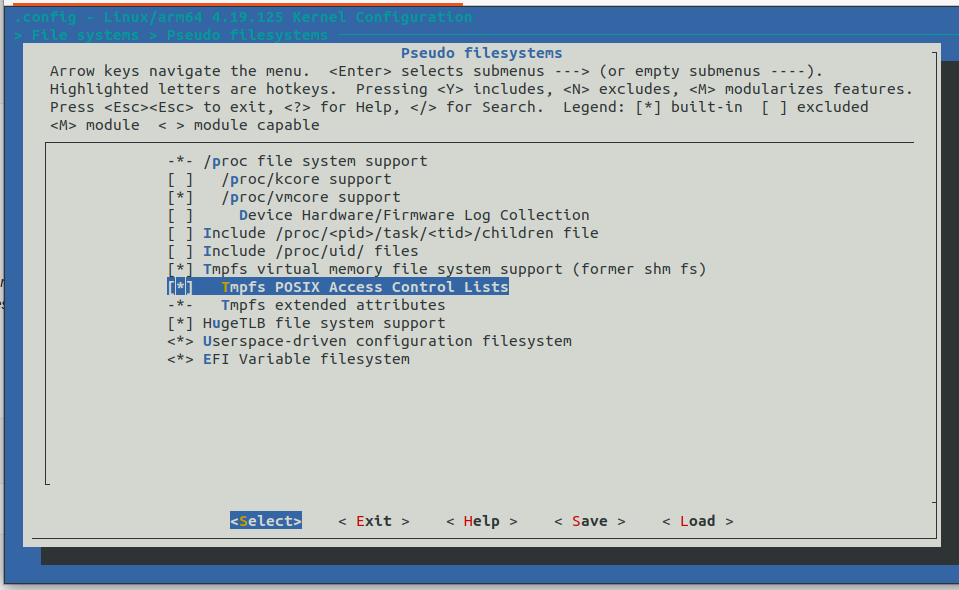
pmbootstrap checksum linux-sony-pdx206- Before compiling, edit the kernel config. In the kernel editor page, use the left and right arrow keys to move to Exit, press Enter, and save the kernel config.
pmbootstrap kconfig edit-
Newly ported devices add four patches by default. If kconfig shows cannot apply patch, remove the patch filename from
$configin APKBUILD. If “Please don’t include linux directly” appears, addREPLACE_GCCH=0at the very beginning of APKBUILD. -
Generate the checksums again and edit the kernel config.
pmbootstrap checksum linux-sony-pdx206
pmbootstrap kconfig edit-
In the kernel editor page, use the left and right arrow keys to move to Exit, press Enter, and save the kernel config.
-
pmbootstrap will then check which kernel configs are missing and show yellow WARNING messages:
[12:15:36] (native) generate checksums for linux-sony-pdx206
[12:15:37] WARNING: linux-sony-pdx206/config-sony-pdx206.aarch64: CONFIG_ANDROID_PARANOID_NETWORK should *not* be set. See <https://wiki.postmarketos.org/wiki/kconfig#CONFIG_ANDROID_PARANOID_NETWORK> for details.
[12:15:37] WARNING: linux-sony-pdx206/config-sony-pdx206.aarch64: CONFIG_DEVTMPFS should be set. See <https://wiki.postmarketos.org/wiki/kconfig#CONFIG_DEVTMPFS> for details.
[12:15:37] WARNING: linux-sony-pdx206/config-sony-pdx206.aarch64: CONFIG_SYSVIPC should be set. See <https://wiki.postmarketos.org/wiki/kconfig#CONFIG_SYSVIPC> for details.
[12:15:37] WARNING: linux-sony-pdx206/config-sony-pdx206.aarch64: CONFIG_VT should be set. See <https://wiki.postmarketos.org/wiki/kconfig#CONFIG_VT> for details.
[12:15:37] WARNING: linux-sony-pdx206/config-sony-pdx206.aarch64: CONFIG_USER_NS should be set. See <https://wiki.postmarketos.org/wiki/kconfig#CONFIG_USER_NS> for details.- Copy these WARNING lines. Then click the URL after each WARNING and check the Wiki to see which configs need to be enabled or disabled. Open the kernel editor page and enable or disable them with the Space key:
pmbootstrap kconfig edit- After adjusting everything, Exit and save. Check whether the kernel config meets postmarketOS requirements. If successful, it returns
kconfig check succeeded!.
pmbootstrap kconfig check5. Compile the Kernel #
Now start compiling the kernel. This may be the longest step. While compiling, remember to open another terminal and run pmbootstrap log to check error messages.
pmbootstrap compiles the kernel according to the steps written in APKBUILD. First it downloads the kernel source from the URL in #Sources, then applies config-sony-pdx206.aarch64 as the kernel config. After that it runs make according to the commands in the build() block, so you can add make -j8 here to speed up compilation.
5.1. Start Compiling the Kernel #
- Run the following command to start compiling:
pmbootstrap build linux-sony-pdx206
# If you want to modify the kernel source yourself, add the src parameter during build and compile from your extracted files:
pmbootstrap build linux-sony-pdx206 --src=/home/ivon/下載/android_kernel_sony_sm8250/- If things go smoothly, it should finish in about half an hour:
>>> linux-sony-pdx206*: Tracing dependencies...
>>> linux-sony-pdx206*: Package size: 55.0 MB
>>> linux-sony-pdx206*: Compressing data...
>>> linux-sony-pdx206*: Create checksum...
>>> linux-sony-pdx206*: Create linux-sony-pdx206-4.19.195_p20220910214444-r0.apk
>>> linux-sony-pdx206: Build complete at Sat, 10 Sep 2022 14:03:42 +0000 elapsed time 0h 18m 58s
>>> linux-sony-pdx206: Updating the pmos/aarch64 repository index...
>>> linux-sony-pdx206: Signing the index...
Of course, things usually are not that simple. If compilation hits an error, it stops. At that point, read the error messages in pmbootstrap log or ~/.local/var/pmbootstrap/log.txt and start debugging.
5.2. Debugging #
Warnings from compilation can be ignored for now. The thing to fix first is error.
Things you can try:
- Use
grepto search other postmarketOS devices for similar error messages, add their patch file to this phone’s APKBUILD, runpmbootstrap checksum linux-sony-pdx206, then build again.
grep -r 'perf_trace_counters\.c' ~/.local/var/pmbootstrap/cache_git/pmaports/device/testing/-
Change compiler. pmbootstrap uses the latest GCC by default. Some Android kernels only compile with older GCC, or you can consider using CLANG.
-
Switch to another kernel source with fewer problems.
-
Ask for help in the postmarketOS Matrix channel.
6. Set Device Parameters and Build the Device-specific Package #
This step configures and builds the device specific package for this model.
- After the kernel compiles successfully, switch to the device package directory:
cd /home/$USER/.local/var/pmbootstrap/cache_git/pmaports/device/testing/device-sony-pdx206- At this point, you can let pmbootstrap analyze boot.img’s boot parameters again and add the results to
deviceinfo.
pmbootstrap bootimg_analyze /home/ivon/下載/Evo/extracted_20220826_113410/boot.img- Edit
deviceinfoand set the screen resolution:
deviceinfo_screen_width=1080
deviceinfo_screen_height=2520-
According to the sony-pdx206 notes on the postmarketOS Wiki, Sony’s software implementation has a problem: enabling UFS will cause the bootloader to be erased. So do not flash rootfs to the phone.
-
Check the files again, then build the device-specific package:
pmbootstrap checksum device-sony-pdx206
pmbootstrap build device-sony-pdx206
Now the postmarketOS kernel and device package for the Sony Xperia 5 II are built. Next, create the installation files.
7. Flash to the Phone #
- Create the postmarketOS installation files. It takes about 10 minutes. During the process, it will ask you to create a user password.
pmbootstrap install- Since UFS cannot be used, the installation files can only be flashed to the phone’s SD card:
pmbootstrap install --sdcard=/dev/sdX- Put the phone into fastboot mode and boot from the kernel.
pmbootstrap flasher boot
# Because of the Sony software issue described above, do not use this command unless you really want to flash to the phone's boot partition
pmbootstrap flasher flash_kernel- Shut down pmbootstrap on the PC:
pmbootstrap shutdown8. Results #
If the screen shows nothing, you can still connect the phone to the PC over USB and then use ssh to see whether it entered the system.
The result: this Sony still has no display.
If you can enter the desktop, submit a merge on GitLab and put result photos on the Wiki.
The next step is to replace the downstream kernel with a mainline kernel. Stock Android kernels are usually downstream kernels, with a pile of extra patches and closed firmware. Replacing the kernel with a mainline kernel is the actual endgame of postmarketOS.