This explains how to emulate an x86_64 Ubuntu system on an ARM64 (Aarch64) Android phone through Termux proot-distro.
1. Explanation #
You may say: most Android devices are ARM64, right? Why not just install the ARM version of Ubuntu? Some programs are just obnoxious and are not compiled for ARM.
So on the road of force-running x86 programs, we have three choices:
- Run an ARM64 system and install the Box64 translator
- Use qemu-system to start a complete x86_64 emulator, such as Ubuntu x86_64 + QEMU
- Use qemu-user to emulate an x86_64 system.
qemu-system runs a virtual machine, emulating complete hardware devices so Linux can run as if it were on a real computer. Of course, it consumes a lot of resources.
qemu-user, on the other hand, is a userspace emulator that can emulate x86 executables on ARM64 devices without needing the resources of an entire virtual machine.
QEMU supports emulating many architectures. Besides x86_64, emulating 32-bit x86, RISC-V, and other architectures is also possible.
In Termux, as long as we have a rootfs, we can get a Linux system running without using qemu-system virtual machine emulation.
The proot-distro tool has built-in qemu support. This article discusses using the proot-distro tool together with qemu-user to run an x86_64 system.
Because it is emulated, program execution is naturally slower than native. Add proot’s performance overhead and it becomes even slower. At the end of the article, we will compare the speed of Proot native vs Box64 vs qemu-user.
2. Test environment #
- Phone: Sony Xperia 10 V, Android 13
- Linux kernel version: 5.4
- Termux version: 0.118.0
- qemu-user version: 8.1.0
- Ubuntu version: 20.04 (Ubuntu 22.04 runs into a problem where apt pub_key cannot be imported)
3. Create an x86_64 proot Ubuntu #
- Refer to proot-distro rootfs and add the
Ubuntu 20.04_x86_64.shscript. But here we need to change the content a little.
vim $PREFIX/etc/proot-distro/ubuntu20.04_x86_64.sh- Modify it as follows
# Specify the architecture as x86_64
DISTRO_ARCH=x86_64

DISTRO_NAME="Ubuntu20.04 x86_64"

DISTRO_COMMENT="Ubuntu 20.04 Focal x86_64"

TARBALL_STRIP_OPT=0

# Download the x86_64 Ubuntu base
TARBALL_URL['x86_64']="https://cdimage.ubuntu.com/ubuntu-base/focal/daily/current/focal-base-amd64.tar.gz"

TARBALL_SHA256['x86_64']="16c831cc71b8ab79e5156451558df4a025783ba335047f6343518e7225416929"- Install
qemu-user-x86-64
pkg install qemu-user-x86-64- Install Ubuntu
proot-distro install ubuntu20.04_x86_64- Log in to Ubuntu. proot-distro will automatically execute it with QEMU.
proot-distro login ubuntu20.04_x86_64-
Through the
uname -acommand, you can see that the architecture is x86_64, and noExec format errorappears.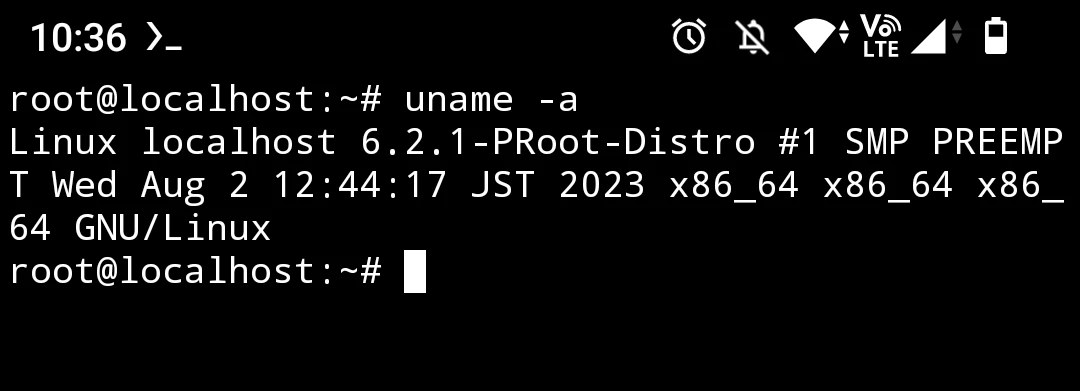
-
If a
signal 11 Segmentfaulterror appears while installing packages, just rundpkg --configure -aonce.
4. Compare native and emulated execution speed #
Note: qemu-user in the table below refers to the method in this article
native represents the arm64 executables installed in proot Ubuntu
Box64 means using the box64 command in proot Ubuntu to translate and run x86_64 executables
Use 7z to extract a 133MB zip file, and use time to measure how long it takes to complete.
| Method | qemu-user | native | Box64 |
|---|---|---|---|
| Completion time (seconds) | 5.895 | 2.064 | 2.141 |
From the results above, the speed ranking is native > Box64 > qemu-user
5. Conclusion #
qemu-user is still slower than Box64.
The benefit of using qemu-user is that the entire Linux system is emulated, but without consuming resources like qemu-system
If using the Box64 approach, users cannot install x86_64 packages from APT, but qemu-user can. qemu-user also has fewer unknown system call errors.
An ARM64 system with Box64 is suitable for occasionally running x86_64 programs, as long as the program does not depend on too much libc or particular libraries (Box64 has to implement system calls one by one).
qemu-user basically does not have this problem, so it is suitable for cases dedicated to emulating x86 programs.
However, qemu-user still throws Segmentfault errors from time to time, causing packages for graphical environments to fail to install.