Ubuntu Touch is a Linux mobile operating system for phones. It was originally developed by Canonical, Ubuntu’s parent company, and is now maintained by the UBports Foundation.

Its strengths are a more polished interface, multilingual support, and input methods for different languages. The desktop environment is Lomiri (Unity 8), and the system is based on Ubuntu 20.04.
UBports is currently focused on porting Ubuntu Touch to older Android phones. Some models use the Halium Project compatibility layer to work around hardware issues, but they may not be able to run the latest mainline Linux kernel.
To simplify installation, any device listed on the official supported devices list can be flashed using the official UBports Installer.
By comparison, if a device only has an unofficial port, you have to manually flash the stock Android firmware and Ubuntu Touch package provided by the port author.
In the example below, my phone is an officially supported Xiaomi Pocophone F1, and the computer is running Ubuntu 20.04.
1. Install UBports Installer #
Download the installer from the official website. It supports Linux, Windows, and MacOS.
On Ubuntu 20.04 or later, you can install it directly with Snap:
sudo snap install ubports-installer2. Flash Ubuntu Touch #
-
Reboot the phone into fastboot and connect it to the computer.
-
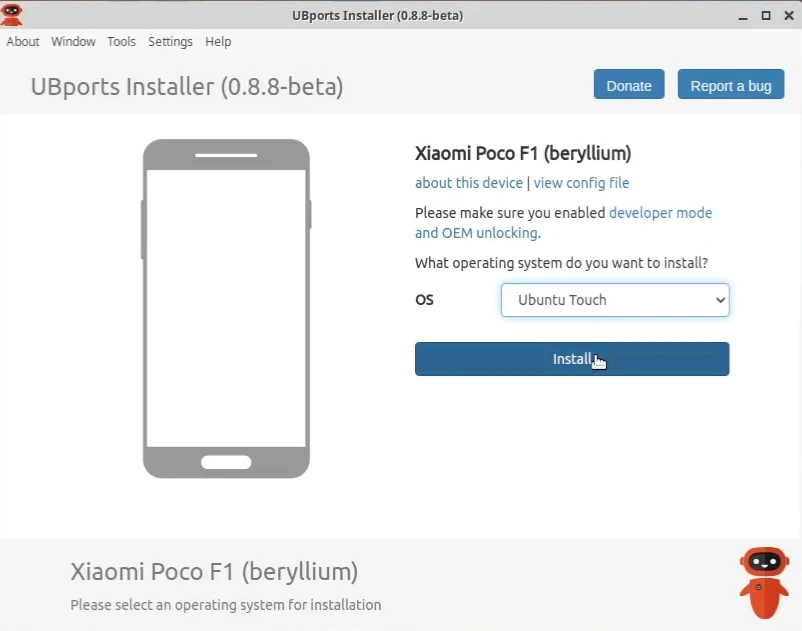
UBports Installer should automatically detect the device. Follow the on-screen instructions, and it will start downloading the installation package.
-
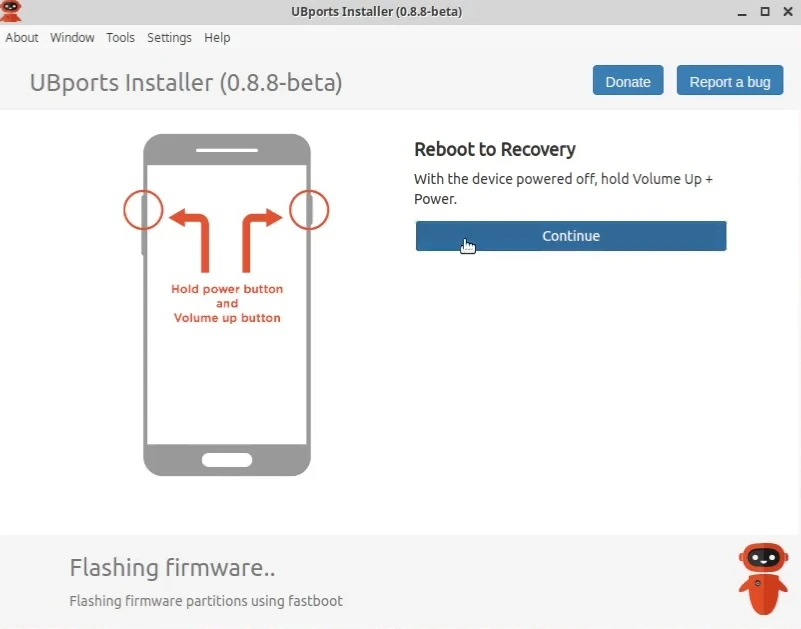
After flashing, you may need to manually reboot into Recovery. Keep following the on-screen instructions and wait for it to finish.
-
After the phone reboots, installation is complete.
3. Post-install tweaks #
See Ubuntu Touch tips.