In this article, Ivon wants to discuss the development status of the “X Window System” and “Wayland” on Linux systems, talk about Wayland’s pros and cons, and help you decide whether you should switch to Wayland. At the end, I also list the Linux distributions that let you experience the newest Wayland technology the fastest.

Things are changing. The Linux community often discusses whether we should abandon X11 and switch to a Wayland session. So, what is X11? What is Wayland?
The X Window System is a set of software that determines how images are displayed on your Linux computer, but it is too old and has many problems. Now there is software that adopts the Wayland protocol, aiming to replace this old software with modern code. However, because Wayland has had problem after problem, even though more and more Linux systems are adopting it, after 10 years of development the X Window System still cannot be completely replaced. Below, let us examine why.
1. The Opportunity for Change: Comparing X11 and Wayland #
The X Window System and Wayland are both sets of software responsible for displaying graphics on Linux. As for comparing their underlying principles, I am too limited in learning to embarrass myself here; there are already plenty of resources online, and the “Further Reading” section at the end has many interesting articles you can read in detail. Here I will briefly summarize my personal understanding.
The X Window System, abbreviated as X, was born earlier than Linux. The X Window System appeared in 1987 and was used to display graphical environments. That was still the age of Unix! By now it already has more than 30 years of history.

Why does Linux need to “install” the X Window System before it has a graphical display? Because the Linux kernel really does not include software for displaying graphics.
The desktop environments Linux users see, such as GNOME, KDE Plasma, and XFCE, do not directly control the screen. Instead, they are built on top of the graphical display mechanism provided by the X Window System. The X Window System is responsible for the lowest-level window display and input events, while the desktop environment is responsible for the user interface and operating experience.
Here, the X Window System became the common low-level standard followed by various desktop environments.
At the beginning, the designers only defined the X communication protocol standard; they did not specify X’s implementation in detail, so different X window software projects appeared. Around 2000, the X.org software developed by the X.org organization replaced XFree86 and gradually became the accepted standard. APIs and the like were all defined by them. X.org was therefore adopted by major desktop environments. Because the X protocol adopted by X.org is version X11, the X server they developed is also called X11.
The reason the X Window System is called a server is that it can accept simultaneous connections from multiple X clients. This is a “client-server architecture,” echoing the needs of the old mainframe era, and it communicates through Network Transparency. See the diagram below for the principle.
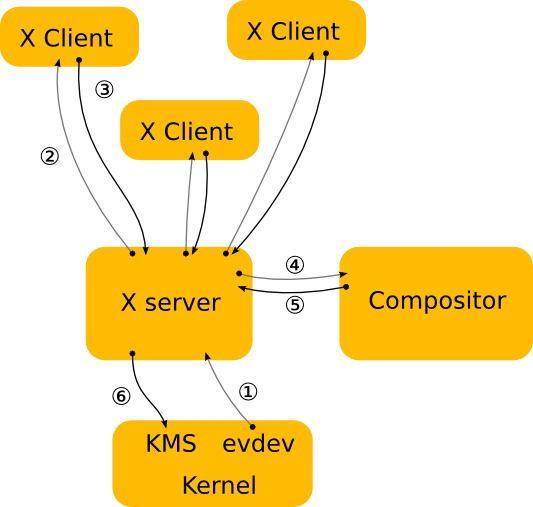
What is Network Transparency? Through an X server, you can transmit a window from another computer over the network and display it on your own computer. This lets many people connect to the same host and work at the same time.
And on personal computers, the X Window System also communicates according to a client-server architecture. Each software window is an X client that communicates with the X server on your computer, and then the image is displayed.
As for what desktop windows should look like, the X Window System protocol does not specify that in detail. This gave desktop environment developers a great deal of room to maneuver. Developers can use a compositor to decide the appearance of windows, including the position of the close button, title bars, animation effects, and so on. That is why cool 3D animated desktops like Compiz could appear.
The client-server architecture is both an advantage and a disadvantage of the X Window System’s design. The advantage is that remote work is convenient and highly flexible.
The disadvantage is that security is poor. Who said the “server” must be running remotely? The X server on your computer also maintains a client-server relationship. Transmission between programs is not encrypted and can easily be intercepted by other programs, such as keyloggers. Also, frequent transmission between client and server causes poor graphics efficiency and leads to screen tearing.
Although most desktop environments and GPU drivers have found ways to avoid the tearing problem, Nvidia still phones it in, because its drivers are not open source and often run into problems.
There should be a better solution to the problems of the X Window System… and so Wayland appeared in 2008, initiated by developers who had once participated in the X11 project.

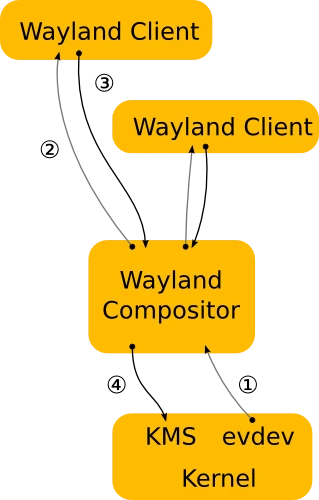
Wayland aims to completely change the client-server architecture of the X Window System, allowing programs to use graphics hardware more efficiently. Wayland itself is a communication protocol specification; the software actually responsible for drawing windows is called a Wayland compositor.
In other words, Wayland developers only define the communication protocol specification. They do not specify in detail how compositors should be implemented; they only released a reference implementation called “Weston.”
Here is a diagram of Wayland’s principles. You can see that the X server is gone, everything is handled by the compositor, the entire communication process has been simplified a lot, and Network Transparency has also been cut.
So what is “X"Wayland? To prevent a pile of old programs under the X server from becoming unusable, Wayland developers proposed XWayland as a transitional solution: run an X server under Wayland so those old programs can operate under Wayland. Even so, XWayland does not guarantee 100% compatibility with old X programs. Some bizarre APIs may not be usable, and developers are still better off rewriting their programs into native Wayland programs.
Now that Wayland is here, what about X11? You should know that X11 development has basically stopped, and many new features in the Linux world have shifted toward Wayland, such as code for supporting HDR content.
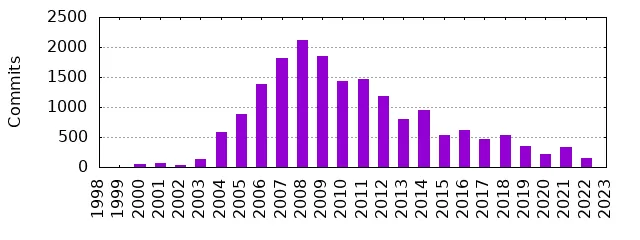
According to Phoronix’s report, X11’s development pace has reached a historical low in recent years; it is basically not moving.
Do you know why? I heard there are only three people in the world who can understand the entire codebase of the X Window System. You know and I know, but Captain One-Eye does not know. If even Captain One-Eye does not know, developers have no way to begin modifying the ancient X server code. Many X server designs no longer meet modern needs. It is time to abandon X, so developers simply made something new.
But because of all kinds of problems, as of 2024 when this article was written, Wayland still cannot replace X.
2. Why Use Wayland? #
Wayland’s more obvious advantages are as follows:
- Whether GNOME or KDE, Wayland animations simply look much smoother than X11.
- Better graphics performance. It thoroughly solves the screen tearing problem, benefiting users of Nvidia proprietary drivers.
- Supports modern graphics features such as non-integer scaling for HiDPI screens, different resolutions on different monitors, HDR images, VRR dynamic refresh rates, and so on.
- Browser support for two-finger zoom.
- Better support for touch gestures. GNOME and KDE Plasma can use touchpad gestures to switch desktops, and Firefox and Google Chrome can use two-finger zoom and swipe left or right to go back to the previous page. These are only available on Wayland.
- Makes good use of PipeWire and XDG Desktop Portal technologies to unify screenshots, screen recording, audio processing, screen sharing, remote desktop, and file picker paths.
- Strengthens system security and eliminates keyloggers.
At this stage, even if you do not like Wayland, you can switch back to an X11 session at any time from the login screen, the Display Manager. The two can coexist.
3. Why Not Use Wayland? #
Once you start talking about Wayland’s shortcomings, there is no end to it.
I heard that if you post this image in the Linux community, you will get beaten.

The crudest reason: Wayland lacks killer apps. Almost no program “must have Wayland.”
This article written by probonopd, the advocate of the AppImage format, summarizes things very well. It lists Wayland’s unresolved problems one by one and is updated in real time. People argue below it every day XD
I remember the earliest title of this article was “Boycott Wayland. It breaks everything.” At first it told people to boycott Wayland, and later it was changed to urging people to think twice before adopting Wayland.
For more concrete Wayland problems, see the list organized by KDE developers: Plasma/Wayland Known Significant Issues
Why is Wayland so controversial? Because it is closely related to the user interface. Problems caused by Wayland are visible to the naked eye and greatly affect the user experience of operating a Linux system. If you are an everyday Linux user, you will definitely encounter the things mentioned in probonopd’s link above.
Let me talk about more practical problems, starting with browsers. The latest Firefox uses a Wayland session by default and is almost problem-free. But Chromium-family browsers, such as Chrome, Brave, Edge, Vivaldi, and Opera, still have poor Wayland support as of v131. Under Wayland, Chromium still defaults to running in XWayland mode! This leads to poor performance.
If you force startup parameters and launch pure Wayland mode with the command chromium --ozone-platform-hint=auto, guess what happens? Fcitx5 cannot input Chinese! According to the Fcitx5 Wiki, you also need to add the --gtk-version=4 parameter for it to work properly. Hmm, the problem is that even after I added it, it still did not work. It turns out there is also a --enable-wayland-ime parameter! Even if Chromium really does configure pure Wayland mode for you, it actually does not support VA-API hardware acceleration? This feature was only fixed in January 2024.
Friendly reminder: many programs written in Electron are also affected by Chromium. Chromium bugs are also reflected in Electron programs, such as Visual Studio Code. If developers stubbornly refuse to update the Electron core version, this problem will only get worse.
Take another program as an example: OBS Studio sometimes has problems with window capture under Wayland. When the window selection dialog pops up, it is all black, and you may need some workaround to operate normally. Whether GNOME or KDE, as long as Wayland is used, this kind of problem happens from time to time, while the X11 session almost never has this problem.
In addition, many remote desktop programs have problems under Wayland. Although WayVNC and WayPipe have appeared, their performance is not great. Only RustDesk and Sunshine have added Wayland support.
Wine, which translates Windows programs and is the upstream project of Steam Deck Proton, only added an experimental Wayland driver in this year’s latest 9.0 version. Now, even among native Steam games, very few support Wayland. Many games still run through XWayland, causing gaming performance problems in Wayland environments.
Although Wayland has improved HiDPI screen problems and allows arbitrary scaling factors, older XWayland programs do not scale along with it. If you force XWayland programs to scale, they become blurry. Neither GNOME nor KDE has a good way to handle this problem.
KDE 6.0 claims to have major improvements in Wayland support, yet even KDE’s own programs still produce weird bugs such as Gwenview windows becoming huge, the mouse becoming huge, and Kate popping up inexplicable floating windows. The KDE font viewer still does not support Wayland even now.
The color management system that has existed under X11 for years has not yet been implemented in Wayland either; it will only arrive with KDE 6.
Oh my god. The X11 desktop works out of the box, but the Wayland desktop is full of problems.
If a program under Wayland requires users to manually fiddle with a pile of things before it can be used normally, that means Wayland is simply not ready yet, right!
Ah, you can blame desktop developers, right? Who told them not to write their compositors properly?
Yes! Inconsistent standards are one of Wayland’s biggest problems!
This image explains it well:
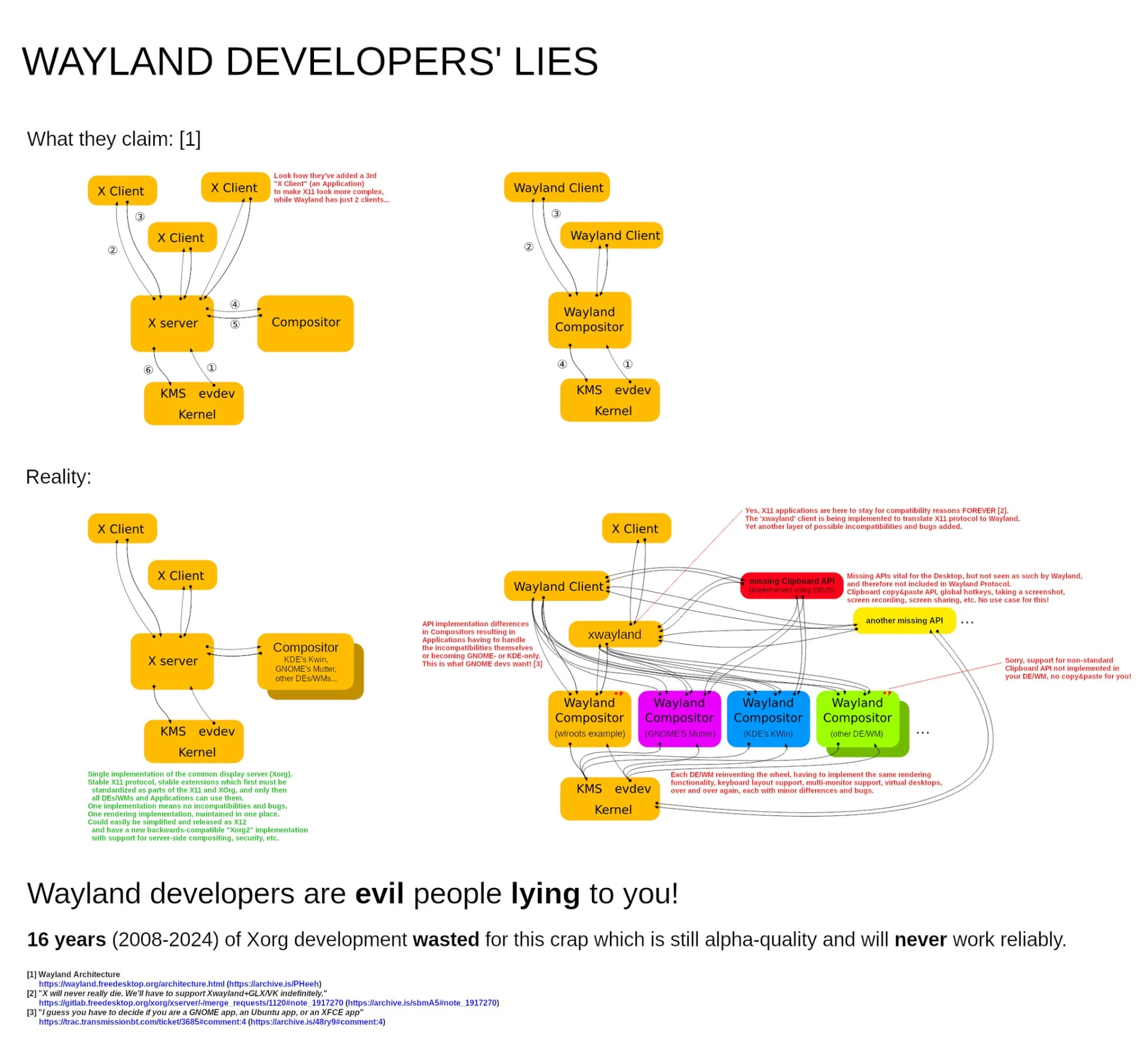
Wayland is actually not a direct replacement for X11. It is almost a different thing! Many old protocols have no corresponding equivalent on Wayland and must wait for developers to implement them one by one.
For software developers, they also have to adapt to Wayland’s changes, or to put it bluntly, rewrite the entire program.
In the past, everyone used the X Window System implementation from X.org, with unified APIs to follow, and each project developed window compositors accordingly. But after entering Wayland, the X server is gone, and each project has to figure out how to make its own Wayland compositor.
There is no such thing as centralized development in the Linux world, and this leads to the situation where each project has different standards. As mentioned earlier, Wayland developers only define the communication protocol and do not specify in detail how compositors should be implemented. There are probably at least more than 10 Wayland compositors now. GNOME’s Mutter has Mutter’s implementation, KDE’s Kwin has Kwin’s implementation, and Hyprland also has its own implementation.
Although open source organizations coordinate standards, and well-known libraries such as GTK and QT have also followed up with Wayland support, abstracting away low-level system things to reduce developer burden, there are always some standards that cannot be unified.
The developer of Fcitx5 complained about this problem on his Blog. To support major desktop environments, he implemented four input method protocols and even submitted PRs to KDE to improve their compositor.
Even if a program runs in XWayland mode, it is not a 100% perfect solution. It causes application performance to drop, scaling to become blurry, and some programs cannot even share the clipboard or drag and drop paste. But because Wayland development is imperfect, a pile of developers still choose this compromise solution, not developing native Wayland programs and instead slacking off with XWayland.
In summary, if you really dig into Wayland’s problems, in the end, you will become half a Linux developer.
If you have talent, you might even discover a library called wlroots and begin writing your own Wayland compositor! Join the ranks of developers of Sway, Hyprland, river, Wayfire, and others.
4. However, Wayland Is Still the Future Trend #
Things are changing. Wayland is like Systemd, PulseAudio, PipeWire, and Avahi: when they first came out, they were cursed constantly, but in the end, they were gradually accepted by the masses.
Why is that? The Wayland shortcomings, bugs, and defects mentioned above will slowly be resolved in the future. The Wayland problems mentioned in this article may disappear a few months later.
The song by Kansas has already told you: CARRY ON MY WAYLAND SON!
Although Wayland has many problems, developers around the world are very seriously fixing bugs. Major Linux distributions are gradually making Wayland the default option.
Commercial companies RedHat, Canonical, and SUSE are strongly pushing Wayland as the default option. RedHat is even preparing to completely remove X.org in RHEL 10.
Valve and AMD cooperated to make Wayland on Steam Deck support HDR. Even Nvidia, whose drivers stubbornly refuse to be open source, is gradually improving Wayland support. More new features are on the way.
In the next few years, GNOME may completely cut the X11 login option and become a pure Wayland environment, and GTK will also formally abandon X11 support along with it. But what I am talking about here is the schedule for rolling releases. Stable update distributions such as Ubuntu LTS and Debian Stable may take longer to enter a pure Wayland environment.
How many years will it take for X11 to die completely? I estimate another ten years. Only when Debian Stable and Ubuntu LTS also use Wayland “by default” will it be truly mature. Currently, Ubuntu 24.04 still uses an X11 session by default.
5. How to Switch to Wayland? #
As mentioned above, Wayland is not a single piece of software. It is implemented individually by each desktop environment.
The biggest considerations are always your Linux distribution’s update speed and your desktop environment’s level of Wayland support.
How do you know whether you are using X11 or Wayland? Open a terminal and enter the following command, and you will get a clue.
echo $XDG_SESSION_TYPEIf you want to switch between X11 and Wayland, the system login screen, the Display Manager, usually provides an option for you to choose.
As of the time of writing, the Wayland support status of each desktop environment is as follows:
- GNOME 48: The elder brother of Linux desktops. It has had good support since GNOME 42 and almost no bugs. But having no bugs does not mean it can completely replace X11’s features.
- KDE Plasma 6.4: It is getting better, but there are still many problems. As for versions before KDE 5.27, be cautious and fearful. Although KDE supported Wayland as early as version 5.4, I still do not really dare use it. Broken graphics and taskbar crashes come one after another.
- XFCE 4.20: Already has preliminary Wayland support.
- Cinnamon 6.0: Already has preliminary Wayland support.
- LXQT 1.4: Announced in 2024 that it will support Wayland.
- Tiling window managers such as i3wm and dwm: They cannot be ported, but can be replaced with Sway and Hyprland. Experts who use these tiling window managers probably do not need me to tell them; you can judge for yourself whether it is appropriate.
If you want to switch to a Wayland environment, first try a Linux distribution that ships the “GNOME” desktop environment. GNOME is the elder brother of Linux desktop environments, and its Wayland support is the best.
As for Linux distributions, if you want to receive Wayland updates and bug fixes quickly, then users of rolling releases such as Arch Linux, Fedora, openSUSE Tumbleweed, Debian Sid, and Gentoo have an advantage. Users of stable releases such as Debian Stable, Ubuntu LTS, openSUSE Leap, and Rocky Linux have to wait longer.
Further Reading: Tracking Wayland Development Progress #
- Wayland’s official page on FreeDesktop.org: https://wayland.freedesktop.org
- Unresolved problems in the Wayland environment: Think twice about Wayland. It breaks everything!
- Can we migrate to Wayland yet: Are we Wayland yet?
- A weekly post written by a KDE developer: Does Wayland really break everything?
- An article by Huibang Chenggong that vividly explains the principles of the X Window System: 【心得】Linux 出專欄啦! (14):桌面環境系列=〉x11 和 wayland ,談技術債與財源問題(厲害吧!!)
- Understand what X11 is through HTML5: Explanations - X Window System Basics