Flatpak version at the time of writing: 1.14.4
“Flatpak, the future of Linux applications,” says the Flatpak official website.
Why is installing applications on Linux sometimes a nightmare? Why can Flatpak effectively ease this problem?
In this article, Ivon briefly explains why Flatpak emerged, as well as the advantages and disadvantages of Flatpak technology.
Terminology:
- “System programs” refers to software such as compilers, runtimes, and libraries.
- “Graphical programs” refers to software with graphical interfaces, such as office software, image processing, browsers, and so on.
* This article by Ivon mainly discusses the advantages and disadvantages of Flatpak technology. For the actual usage of Flatpak packages and commands, please see this article.
1. The Application Installation Problem of Linux Distributions #
First, let’s talk about the background behind Flatpak’s creation.
We all know that installing applications on Linux only requires downloading and installing them through a package manager. That is also what application stores do behind the scenes.
Linux now has at least more than 100 distributions, which creates software packaging problems.
Different distributions have different package managers, and the commands for installing applications are all different. Sometimes package dependency conflicts also occur.
Furthermore, each distribution maintains its own online package repository. Popular distributions include many programs; for example, Ubuntu and Arch Linux AUR have almost everything. By comparison, niche distributions (Void, Alpine) have to wait until their communities take shape before repository package counts accumulate; otherwise, users have to compile manually from source code.
Different distributions packaging software causes application versions to be inconsistent. For example, new Ubuntu versions include the latest programs, while LTS versions lag behind, causing updates to be out of sync.
So technologies attempting to unify cross-distribution application installation appeared. Flatpak is one example, while others include Snap and AppImage.
2. What Is Flatpak #
Flatpak, previously called xdg-app, is a cross-distribution package manager and package deployment system initiated by RedHat. Most Linux distributions (Debian-based, Fedora-based, openSUSE-based, Arch-based) already support Flatpak, ChromeOS has it too, and Fedora Silverblue is even an almost fully Flatpak environment.
Flathub is the most popular Flatpak package repository, with thousands of applications already listed.
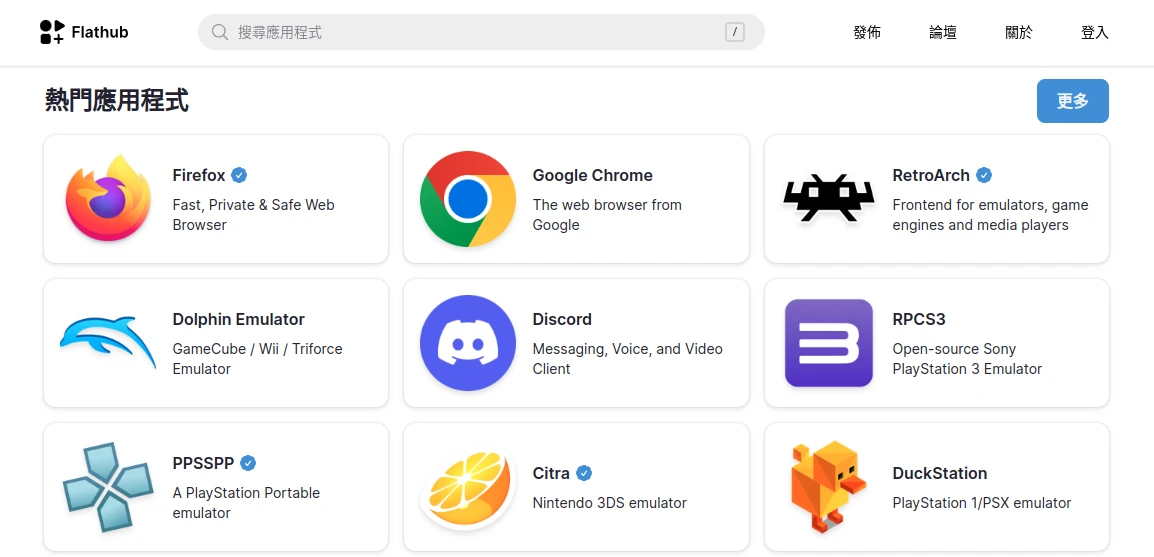
In recent years, Linux graphical applications have gradually moved toward a trend of unified distribution, relying on cross-distribution technologies such as Snap, Flatpak, and AppImage, rather than relying on each distribution’s package manager to package software separately, preventing inconsistent program versions.
Flatpak mainly targets desktop graphical applications, such as browsers, office processing, image processing, games, and the like. Flatpak introduces a sandbox mechanism to isolate APPs and designs a permission system to strengthen security.
3. Advantages of Installing Applications With Flatpak #
3.1. Flathub Makes Deployment and Publishing Convenient for Developers #
Flathub benefits developers. The Flatpak official documentation explains in detail how to package applications as Flatpak and encourages developers to follow XDG standards. When distributing applications, developers can provide stable and testing versions for users to download, as well as versions for different architectures such as x86 / ARM. The Flatpak installer judges automatically.
Usually users download Flatpak packages from the Flathub repository. Some organizations run their own Flatpak repositories, such as RedhHat. Flathub is somewhat different from Canonical’s Snap Store: it is not a private corporate platform, but a website operated by the GNOME Foundation (source). Submitting applications requires no fee, and Flatpak packages can be freely submitted on Github. Users can also freely change Flatpak remote repositories and do not need to accommodate Flathub as the single platform for downloading applications.
The Flathub website displays information such as application download counts, AppStream user ratings, software licenses, and permissions. In addition to showing a large “Donate” button on application download pages, it may also launch a paid channel in the future.
For end users, Flatpak solves the problem of inconsistent application versions across distributions. Whether you use rolling-update Arch Linux or Debian that updates once in a geological age, you can enjoy consistent application versions through Flatpak. In addition, Flatpak can choose to install applications system-wide or only for a specific user, letting ordinary users install and delete programs without a root password.
3.2. Runtime Isolation From the System #
Flatpak reuses existing runtimes as much as possible to reduce space usage. So the more Flatpak applications you install, the less space usage becomes a problem. According to the developers, the more Flatpaks you install, the more efficient space usage becomes.
Bundling runtimes with Flatpak has benefits. It ensures each application uses the same runtime instead of depending on the distribution’s system packages, preventing strange bugs caused by distributions patching runtimes. Also, old Flatpak runtimes remain available even after EOL, easing dependency hell.
For example, if an application needs a specific version of Python, installing it with the system package manager requires globally installing Python, and it might even break due to system updates. If installed with Flatpak, Python is automatically bundled with the application and separated from the system’s Python package.
Flatpak can even let applications depending on glibc run on Linux distributions using musl libc. This is the benefit of not relying on system packages.
Flatpak, like Snap, has package management functionality. They can integrate with application stores (KDE Discover, GNOME Software) and be managed through graphical interfaces. AppImage, by comparison, is harder to manage. Without AppImage Launcher, users must remember where the executable file is stored. In addition, AppImage relies more heavily on low-level system runtimes, so it is not truly usable on all distributions either. For example, systems using musl libc will have a pile of AppImages that cannot open and need recompilation. Flatpak’s method of bundling runtimes solves this problem.
3.3. Sandboxing Improves Security #
The image below shows the sandbox operating principle described in the Flatpak official documentation. Dependencies and runtimes for Flatpak applications are controlled by Flatpak and are automatically downloaded when installing applications.
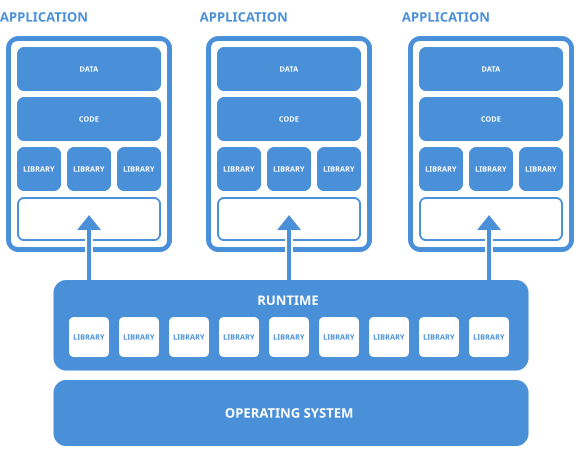
From a security perspective, the permission mechanism introduced by Flatpak is similar to Android. In recent years, Google has required Android APPs to access only some common directories to ensure system security and cleanliness. Applications installed with Flatpak also have this kind of effect, preventing applications from stuffing piles of configuration files into the home directory. Flatpak can restrict applications’ access to network services and specific hardware devices.
Ideally, when developers package programs as Flatpak, they should make good use of the Portal API provided by Flatpak to access user files.
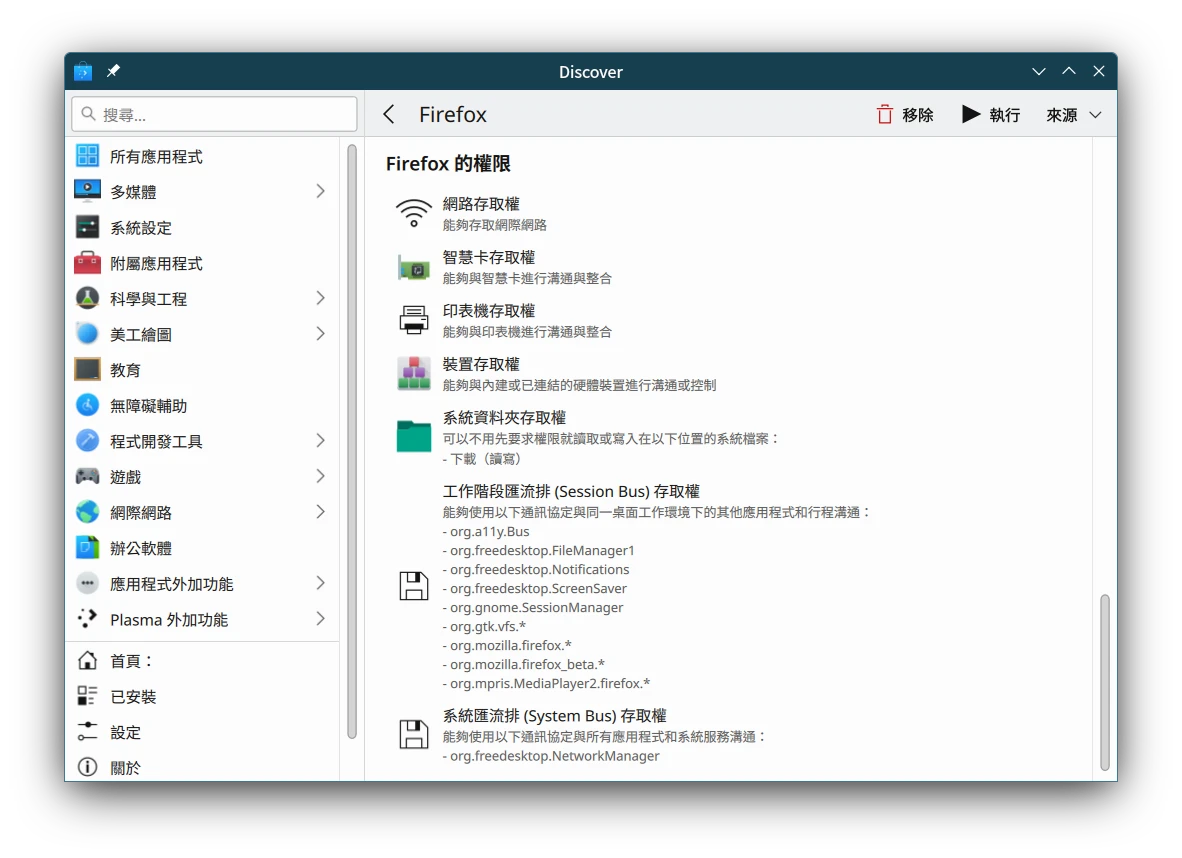
Some Linux application stores list the permissions used by a Flatpak APP on the installation page. The image shows Firefox permissions listed by KDE Discover.
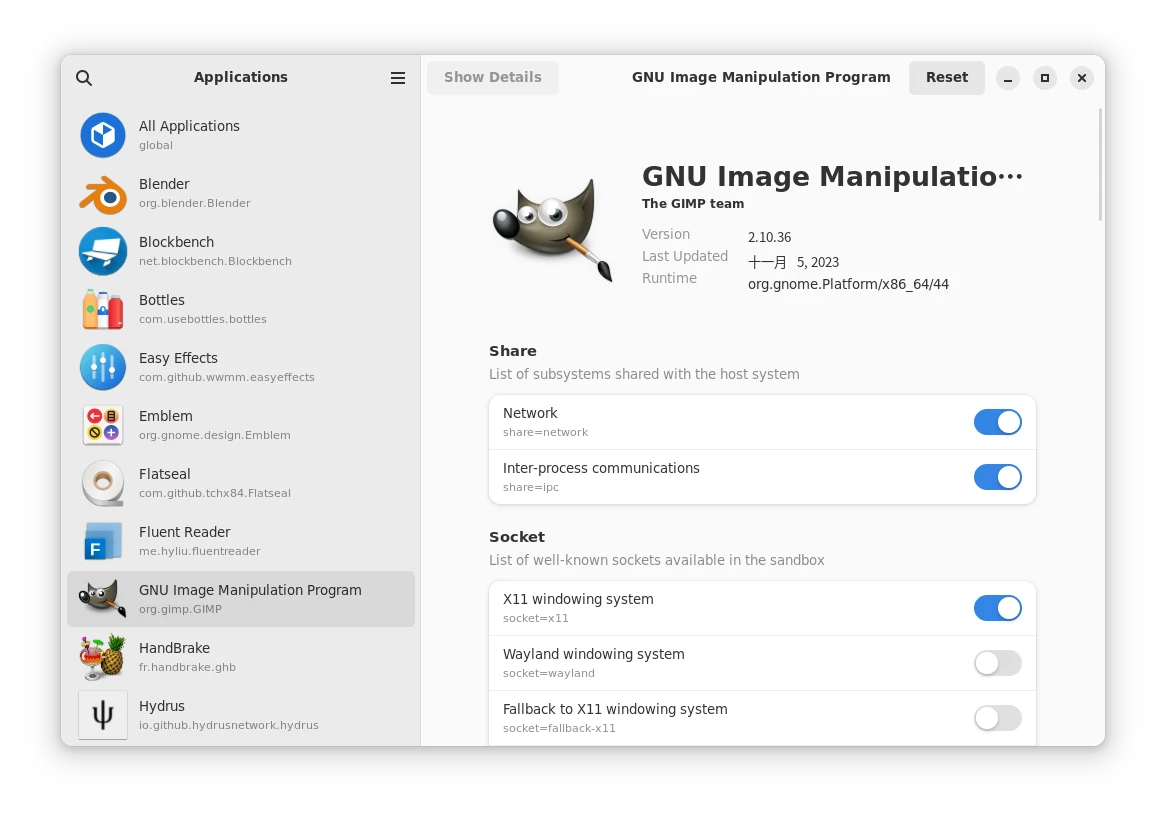
Flatseal can be used to edit Flatpak program permissions without typing commands.
Finally, program data installed by Flatpak is uniformly placed in ~/var/app, so when uninstalling programs through Flatpak, related application data can be deleted with one click.
We can use programs such as Flatseal to turn application permissions on and off, allowing applications to access all user files when necessary.
4. Disadvantages of Installing Applications With Flatpak #
4.1. Applications Are Huge #
Flatpak applications are huge, especially when you do not often use Flatpak to install applications. Installing Flatpak is equivalent to installing a second package manager, so dependencies have to be downloaded separately.
For example, on a newly installed Linux system, downloading the Firefox browser with Flatpak also requires 500MB of space to install dependencies such as Nvidia and GNOME. But through the system’s own package manager, it may take less than 200MB.
If you use Flatpak more often to install applications, this problem becomes less serious. Some runtimes are shared between Flatpak software, so installing each program does not require reinstalling all dependencies from scratch. Setting Flatpak to update automatically every day is also a solution, avoiding a situation where updating after a long time requires downloading a large pile of dependencies. In addition, Flatpak supports incremental updates.
4.2. Poor Sandbox Permission Design #
Not all programs on Flathub are uploaded by the original authors. Some are unofficial packages, causing certain application versions to be old or have strange bugs.
Some Flatpak programs have poorly designed sandbox permissions after packaging, causing them to fail to access files normally, fail to find system executables, fail to wake the Fcitx5 input method, fail to integrate with desktop themes, and so on.
There is also the problem of randomly throwing configuration files around. Some Flatpak programs still place data outside ~/.var/app for various reasons and do not follow XDG specifications.
At present, Flatpak’s method of adjusting permissions easily confuses users. Who wants to know what these buses are for? Is taking a bus really that hard?
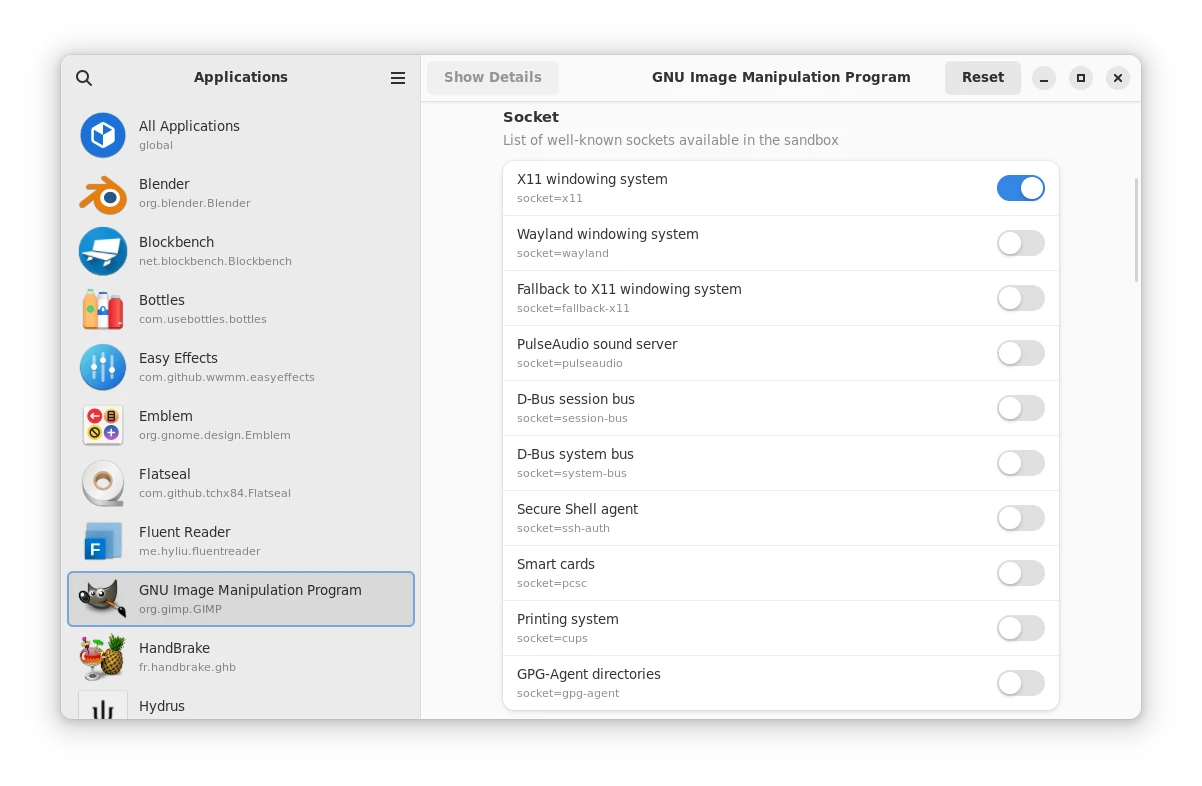
If developers are willing to put some care into the Flatpak version of their programs, they should add a “permission request” dialog like Android, letting users understand the purpose of permissions more clearly.
In terms of security, Flatpak is actually not the safest solution. Flatpak’s sandbox is not completely isolated from the system. Considering Flatpak permission restrictions, programs such as Firefox and GIMP have to request access to all files in the user’s home directory; otherwise, the file picker cannot select files at all. Visual Studio Code and QT Creator also must access system executables, or they cannot compile programs.
If you want a safer sandboxed execution environment, Docker, chroot, or virtual machines may be better choices.
But having a security mechanism is better than having none. At least Flatpak programs cannot see each other’s data directories.
If future program developers are willing to prioritize development around Flatpak’s Portal API, then security can be further strengthened.
4.3. Problems With System Integration #
Some Flatpak programs do not follow the desktop environment’s theme, causing QT programs to look strange in GNOME; conversely, GTK programs in KDE have the same problem. Users have to manually set environment variables to apply themes, which is very troublesome.
Flatpak program launch commands become very long. In the past, typing firefox in the terminal would open it; with Flatpak, you have to type flatpak run org.mozilla.firefox.
Also, Flatpak does not add programs to the environment variable (PATH). Therefore, if you execute the firefox command the way you would with an ordinary package manager, the system cannot find the Flatpak version of Firefox. You have to additionally add /var/lib/flatpak/exports/bin to PATH and set an alias to temporarily solve it.
Finally, there are system programs and server applications. As said above, Flatpak mainly targets graphical applications. System programs are less common, although there are Fcitx5 input method and ffmpeg, but I have not yet heard of anyone installing Java and PHP with Flatpak. This means Flatpak has no particular advantage on servers. By comparison, Snap, which Canonical aggressively promotes, is more complete in this area.
Although Flatpak uses some containerization technologies, it is after all not Docker or Podman, and it is not suitable for running headless server services.
Flatpak’s dilemma is that its design itself cannot change system settings. Put plainly, it cannot have sudo permission to touch system files. The flatpak-spawn command can jump out of the sandbox and execute on the host machine, but what it can do is still limited. This means some software is technically impossible to have as a Flatpak version, such as remote desktop servers and virtual machine software.
Applications suitable for Flatpak installation are mainly desktop programs, as well as applications such as Steam that do not need to touch system settings.
5. Conclusion #
Flatpak’s benefits for developers are obvious, and for users it also simplifies the APP installation process. However, capacity and sandbox issues still depend on how the Linux community improves them in the future.
If Flatpak integrates well with application store front ends, it should improve users’ experience of installing programs.